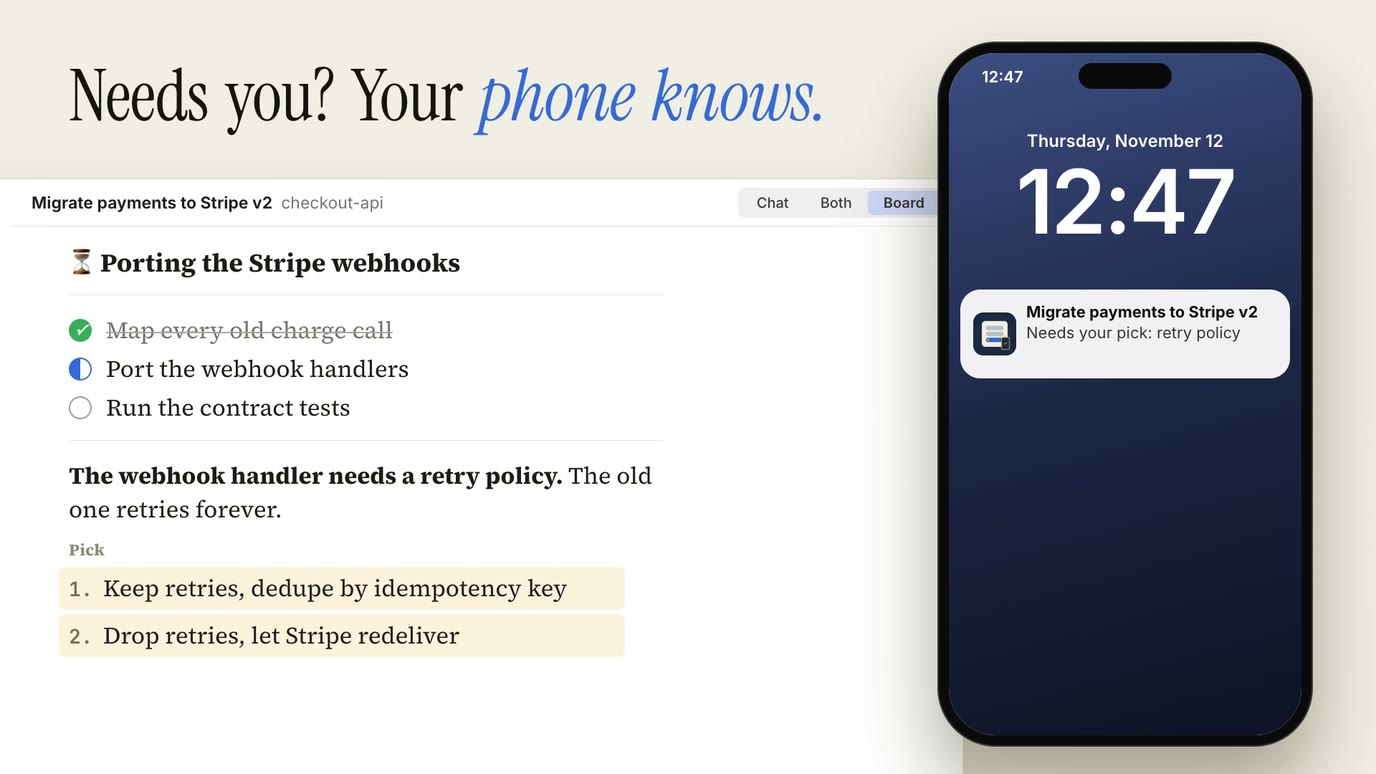
I run Claude Code on my Mac all day, usually several sessions at once. A session often stops on a question or a permission prompt while I’m away from the desk, and it sits there until I get back.
So I built cc-remote. It’s a native SwiftUI app for the Mac and the iPhone, plus a small server on the Mac that runs the sessions. From the phone I can read the chat, allow or deny a tool call, pick an option the session offered, or start a new session in any folder on the Mac. It’s been my daily driver since early November, and it’s now in a closed beta.
The first commit is from October 27. Two weeks later the app did everything above, with push notifications, and Claude Code agents had written almost all of the code. This post is about what had to exist in the repo for that to work. Short version: an agent can’t be trusted to say “it works”, so the repo gives it ways to show that it works.
What it is
There are two parts. The server is Bun and TypeScript, runs as a launchd agent on the Mac and listens only on localhost. The app is one SwiftUI target that runs on macOS, iPad and iPhone. They talk over HTTPS and WebSocket, exposed only to my own devices through Tailscale. There’s no public endpoint, and there’s no plan for one. Each device pairs once with a 6-digit code and gets its own token.
The app has a session list with a status light per session (working, waiting, needs permission), its cost and context size, and a clock that warns me before a long idle makes the next prompt expensive because the prompt cache expired. The chat shows Claude’s replies as Markdown with each tool call folded to one line and edits as colored diffs. Permission requests show as cards with Allow and Deny, and as a push notification when the session is off screen.
It also shows the board. That’s a Claude Code mod I wrote earlier: a pane next to the chat where the session keeps its open decisions as numbered options in a Markdown file. On the phone I tap an option, it lands in the composer, and I send it.
A server that only relays
The server does one job: start, list, stop and relay sessions. Each session is one headless Claude Code process, started through the Claude Agent SDK with streaming input. Prompts from the app enter the session as normal user prompts, so every hook and mod I have runs exactly as it would in a terminal.
The server has no board logic. The mod writes its Markdown file, the server watches the file, parses it and sends it to the app. Anything that works in my terminal sessions works in the app without the server knowing about it.
Two decisions came out of measuring before writing code.
The board only appears if the server tells Claude Code that a desktop-style UI is attached. That call has to happen after the session initializes and before the first prompt. Attach it later and the board’s rules never load for the rest of that process. A spike found this before any app code existed. Otherwise I’d have found it as a “sometimes the board is empty” bug two weeks in.
The SDK version is pinned exactly. The attach call is internal to the SDK, so any release can change it. A version bump is a deliberate change that has to pass the typecheck and the tests.
The wire protocol is defined once in TypeScript and mirrored in Swift, and both sides run their tests against the same JSON fixture files. When an agent changes a message on one side, the other side’s tests fail.
Waves from a todo file
My part of the loop starts in a todo file. I write a request in plain words (“the chat should keep my scroll position when a new reply arrives”), and a small agent whose only job is shaping requests turns it into a todo item. It never implements anything.
The work itself runs in waves, driven by a todo-worker agent in the main session:
- Pick a few related open items, show them to me and wait for a go.
- Settle open questions. Taste questions (which layout, which wording) come to me. Code questions go to a read-only investigator agent.
- A planning agent writes a task plan.
- Coder agents write the code, each in its own git worktree.
- The gate runs. The wave commits only if it passes.
The gate is one command, mise run check, scoped to the files the wave changed. It builds the app and the server, typechecks, and runs the unit tests the change can affect. It prints nothing on success. When it fails, one fixer agent gets the failure and reruns only the failing test, never the whole suite.
Parallel worktrees that don’t collide
Worktrees let several coder agents work at once, but a native app has shared state that breaks when two builds touch it. In this repo every worktree gets its own Xcode DerivedData folder, its own dev server, its own Debug app and its own control port. Builds, test runs, simulator use and app launches go through locks held by the kernel, so a second agent waits in line instead of corrupting the first one’s build. A crashed agent doesn’t leave a stale lock behind either, because the lock dies with its process.
Releases need my go
A wave ends with a release build prepared in a separate folder that touches nothing live. Swapping it in restarts the server, which ends every live session, including the one doing the swap. So that step waits for an explicit go from me, every time. The repo has gone through 27 numbered releases so far.
A ladder of proofs
When an agent says a feature works, it’s usually describing the code it wrote, not anything it saw run. In a UI app the gap is bigger than usual: the code compiles, the unit tests pass, and the button still does nothing.
So the repo gives agents a set of ways to prove a change, ordered from cheap to expensive. A skill picks the cheapest rung that can show the claim:
| Rung | What it proves |
|---|---|
| Unit tests | logic, parsing, protocol |
| Feature checks | the running app does it |
| Fake sessions | a session scenario, no model |
| Model replay | real Claude Code, no spend |
| UI tests | last resort |
Unit tests cover the server and the app’s logic: Swift Testing on the app side, bun test on the server.
Feature checks are the rung that changed the most. The Debug app runs a small control server of its own. A script can tell it to open a session, click a button or type into the composer, and ask it for its state as JSON: which session is selected, what the chat shows, whether a permission card is on screen. A check is a short script that drives the app through that control server and waits on a condition in that JSON. It never sleeps for a fixed time, which is what makes UI tests slow and flaky. There are 134 of them now, and each starts from a reset window.
Fake sessions replay recorded scenarios through the same path a real session takes: a permission request, a very long chat, background work, an expired cache. There are 23 of them, and none calls a model.
Model replay covers the few checks that need real Claude Code, like hooks, mods and real tool calls. The dev server runs a fake Anthropic API that replays recorded answers, so Claude Code runs for real and I spend nothing. When someone changes a prompt, the fake API fails with “no recorded answer” and names the recording, instead of quietly hitting the real API.
UI tests with XCUITest run against a fixture mode, where the app shows canned sessions without a server, on macOS and iOS. They’re slow, so they’re the last resort, used only when nothing cheaper can show the claim.
A map from features to proofs
The piece that made bug reports cheap is a feature map: one entry per thing a user can see or do. Each entry says how to reach it on the Mac and on the iPhone, which control commands and state fields show it, and which fake session renders it.
When I report something like “the permission card doesn’t show on the phone when the session is in the background”, an agent reads one entry and has a repro: which fake scenario to play, what to click, which state field should change. It doesn’t search through view code to work out what I meant. Whoever changes a feature updates its entry in the same commit.
Timing everything
Every automation script prints its elapsed time when it finishes. A step that got slow shows up in its own output, and an agent fixes it while it’s looking at it, instead of me noticing a month later that the gate takes four minutes.
Performance, measured by agents
The same tooling measures speed. Agents recorded these with the feature checks and a performance recorder, in Debug builds:
| What | Before | After |
|---|---|---|
| Switch to a long chat | 2.9 s | 0.47 s |
| Search in it | 5.2 s | 0.95 s |
| Long chat, tool calls open | 938 ms | 149 ms |
| Long session to the phone | 16.26 MB | 0.59 MB |
The third row came from replacing SwiftUI’s list with a native one (NSTableView on the Mac, UITableView on the iPhone) after measuring what the SwiftUI version cost. I wrote about a similar move in an earlier post. The last row is the server sending the last 60 rows of a session first and paging older ones in as I scroll.
My favorite bug: the idle app used 40 to 60% of a CPU core because the prompt-cache clock redrew the whole window every tick. Nobody would have found it by reading code. Measuring CPU at idle found it.
The chat and the board also share one Markdown renderer built on TextKit 2, which replaced a third-party package. A project rule keeps it at one renderer per kind of content (Markdown, code, diffs). A new need extends it with a parameter. Agents like to write a second renderer for the one screen they’re working on, and the rule stops that.
What I still do
The app is about 62,000 lines of Swift and TypeScript, and I typed very few of them. My work was:
- Requests. I write what I want into the todo file, in plain words.
- Taste. Layout, wording, what a status light means. Agents ask, and I answer.
- Hand checks. Look and feel on a real Mac and a real iPhone. Feature checks prove the button works, not that the screen feels right. Built items wait in a “to test” list until I’ve tried them, and that list is always behind.
- Releases. Every swap of the live server waits for my go.
The limits are real. It’s a closed beta. The Mac app ships as a notarized DMG with the server, Claude Code and the board mod inside, and the iPhone app goes out through TestFlight. Each Mac is reachable only over its owner’s own tailnet, and it has to stay awake. It depends on my board mod, which uses an early-access Claude Code API, and on an internal SDK call. A Claude Code release can break both, which is why the SDK is pinned. The repo is private for now.
If you’re building a UI app with agents, start with the control server. A Debug build that a script can drive and read as JSON turns “it works” from a claim into a check the agent runs itself.
If you want to try cc-remote, the beta waitlist is at binarygap.io/cc-remote.